
Inquiry Lookup
Check the status of your inquiry using your inquiry number and contact info
Your inquiry number arrives by email right away
As soon as you send an inquiry, we email the address you entered with the subject "[Freesi] 20260718-10018 의뢰가 정상 접수되었습니다". The same number appears in the subject and in the body. The first eight digits are the date we received it and the rest is that day’s sequence, so the number alone tells you which inquiry it is.
If you lost the number
Searching your mailbox for "freesi" usually finds it. You can type digits only, or prefix it with #, and hyphens or spaces are ignored. If you cannot recall the date part, the trailing sequence alone is enough to try. If it still does not come up, contact support with the phone number or email you used and we will look it up for you.
Two things open a lookup
The inquiry number, and the email or phone you entered when you sent it. They have to belong to the same inquiry. A number alone shows nothing if the contact does not match, and the lookup response never carries contact details or referral data in the first place.
What you see
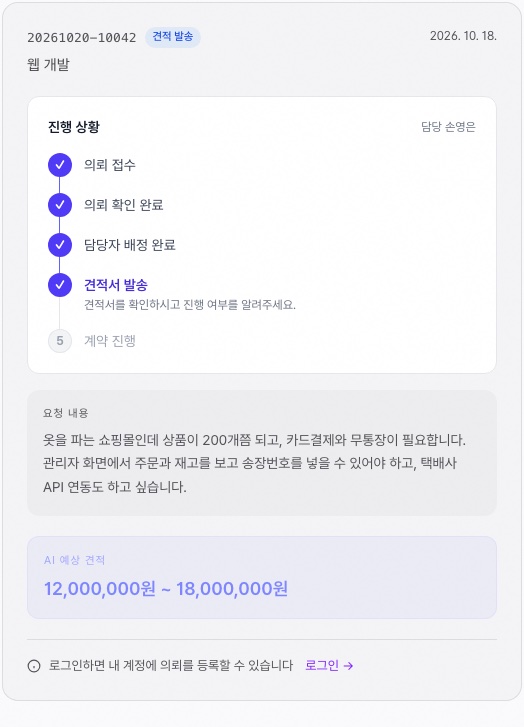
What you wrote, the stage it is in, and — depending on the stage — the AI estimate or the confirmed quote amount. Once a quote has gone out there is a link straight to it, and if the contract is signed and the project is running you also see progress per milestone. Sign in once and it opens from your account without the number.
When the lookup fails
It is usually the contact, not the number. The email you entered differs from the one you normally use, or you gave a company main line and are now trying your mobile. Use the exact address that received the confirmation email and it opens. If no email arrived at all, check spam first; if it is not there either the address may have a typo, so tell support and we will resend it.
When a stage sits still
Sitting in review pending usually means the request was short and there is not enough to price it on. We ask a few questions by email or in the consulting thread, and the stage does not move until those answers come back. If you are in a hurry, send support your inquiry number and we will move it up. Quote emails are not sent on weekends or public holidays; they go out together on the next business day.
We keep no record of lookups
This screen shows one inquiry when the number and contact match, and nothing else follows from the fact that you looked. It carries no ads either. Link the inquiry to an account and you no longer need the number, and the quote, contract and payment history sit in one place.
How the stages move
- 1Received — The inquiry arrived. The confirmation email goes out at this point.
- 2AI analyzing — Reading scope and size from what you wrote to produce an estimated range.
- 3Review pending — Analysis is done and a person checks it. This is where unrealistic numbers get caught.
- 4Quote sent — The quote has gone out. A link to it appears in the lookup result.
- 5Consulting — Working out scope or price together. Questions go back and forth here.
- 6Accepted — You accepted the quote. Contract and kickoff follow.
From received to quote sent we expect one to three business days. If the request is complex we move to the consulting stage in between and ask a few more questions.
When to check
On the day you send it, it sits at received or analyzing. Seeing nothing change that day is normal. Once on the next business morning and again after the quote email covers most of what you need. An email goes out at every stage change, so there is no need to watch the lookup page. If a stage has moved but no email reached you, the address was most likely mistyped.
If you link it to an account
One inquiry is rarely the end of it. Create an account and link it, and you no longer need the number: past inquiries, quotes, contracts and payment history collect in one place. From the second inquiry on you can pull up what you wrote last time and edit it instead of starting over. If this is for a company, handing over the account hands over the whole record even when the person in charge changes.